Blog

  • Save my laptop, save the world

    I think my title is some tagline from some tv show I am not following, but anyway. Today my laptop stopped working. *GRR*. The usual: The power plug in the laptop stops working because it has been molested over the last 4 years.

    I haven’t planned in investing in a new laptop currently, so the alternative was fixing it. After splitting it into every little part I finally found the plug. And yes. The soldering was broken, the plug itself was broken. Needs replacement.

    I never bragged about my soldering skills before, but \o/ – I managed to get it removed – the only spare one I had came with 8 cm wire

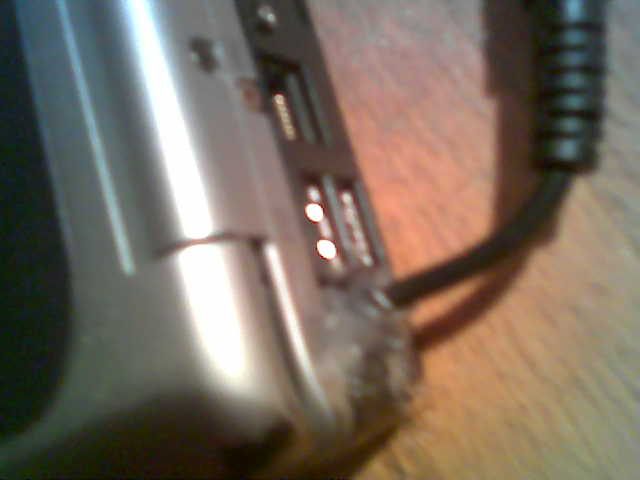
    I now have this wire hanging out my laptop, but it is working again. Even better than before. The last weeks, I constantly needed to wiggle the powerplug. No need for that anymore.

    Finishing off with a big piece of warm glue to keep everything at its place.

    It is not beatiful, but it works:
    laptoprepair.jpg

    I wonder for how long. It is probably time to consider saving up for a new laptop.
  • Working with new dpkg-dev

    Now that dpkg-dev actually is slightly usable again, trying to work with it instead of working against it is something that could be tried.

    In order to find relevant -lfoo’s missing that new dpkg-dev complains about I ended up knitting a small script. I guess I am not the only one having these issues, so I thought I would share.

    Comments welcome. And people wanting to shut up dpkg-shlibdeps in kde are most welcome to speak up and provide patches. A lot of build power is needed – and quite some patience.

  • Debianized splash screens part 3?

    Oh well.. I asked for a couple of brave testers some time ago. I guess it is time to try make my attempted work public. Use it at your own risk and fun. And please don’t comment on my ability to (not) use gimp and (not) to remove white.

    For brave people, try look at http://users.alioth.debian.org/~pusling-guest/.desktop-base/

    Comments are welcome

  • Hit it!

    It’s 106 miles to Chicago. We’ve got a full tank of gas, half a pack of cigarettes, it’s dark and we’re wearing sunglasses.

  • “dpkg-shlibdeps –ignore-buxy” in cdbs

    Some people have been looking for the following, so I thought I would share it:

    DEB_DH_SHLIBDEPS_ARGS_ALL=--dpkg-shlibdeps-params=--ignore-missing-info

  • Working on new kde4 beta

    but where is the debian kde dual quadcore super extreme multiple Gb ram build host ?

    Needs. Faster. Hardware. The rest of the team is doing it so much faster than me.

  • Debianized splashscreens #2 – brave testers wanted

    I have created a couple of packages trying to implement a way to have debian themed splash screens and other images for a group of applications. I have tested it a couple of times in different computers, trying to make it break and such – and I think it is more or less working now.

    So – I am looking for brave test persons wanting to test it/screw up their systems. Requirements:

    • Able to recover from messed up dpkg-diverts
    • Able to recover from messed up alternatives

    As the average reader probably have guessed it involves dpkg-diverts and alternatives. To be a bit more detailed, I have a list of splash screens, divert them, set up alternatives and register the new images.

    Comments? Testers? feel free to speak up.

  • Debianized splashscreens

    Disclaimer: splashscreens should be avoided and programs should start faster. Some programs are just too slow so a splash screen is needed.

    Wouldn’t it be cool if all programs that showed splashscreens actually showed a splash matching the same theme as your desktop environment and your display manager?

    This might going to happen. Besides OOo, amarok and the gimp, which other programs uses splash screens? And where do they store their splash screens?

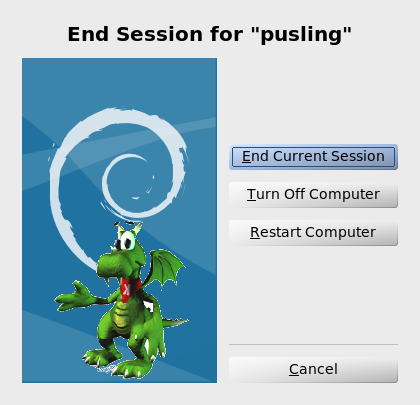
    Artists: This is also your clue to consider it. I don’t have much artist skills, but I have some ideas for the implementation. To show off something, I can start here:

    debianized logout of kde

    The plan is of course to make it as easy as apt-get install debianized-splashscreens to get debianized splash screens – and apt-get remove to get the original splash screens back.

    Oh – and of course easily to change for derivatives who wants some other styling.

  • de-uic

    I found some program today. It had a file, buttons.h which was autogenerated by:
    uic -o buttons.h -embed buttons pics/attach.png pics/detach.png
    Unfortunately, those pictures wasn’t included in the tarball – and as it is seen earlier, uic doesn’t generate endian-agnostic code.

    So what do smart man do now? Write upstream and wait? Could be done. Or figure out how to de-uic the header file.

    Qt and #kde4-devel to the rescue.

    #include "buttons.h"
    #include "qimage.h"

    int main()
    {
    uic_findImage("attach.png").save("attach.png","PNG");
    uic_findImage("detach.png").save("detach.png","PNG");

    }

    compiled with g++ -I /usr/include/qt3/ test.cpp -lqt-mt

    and now there is images that can be uic’ed.

  • Debian armel where are you?

    Around 2 months have passed since 439832 was filed. It seems nothing has happened yet. We sooo want Debian armel in the next release.